The best content publishing flowcharts is what for blogger CMS and other CMSs hosted websites?
Though the main goal of this blog post is to know the flowcharts of how to publish content on a Blogspot blog or a blogger CMS-hosted website, which content publishing flowchart is best for producing highly engaged content on blogger-hosted and other CMS-hosted websites?
But before unveiling the fullest Content publishing flowcharts for the Blogger CMS and other CMSs hosted websites, let's try to cover Is Blogger a CMS?
The blogger community declared it one of the best CMS compared with other CMSs (Wix, WordPress, Squarespace, Drupal, Shopify, Joomla, etc.) though others (affiliate marketers, non-technical hands) don't agree that Blogger is a fully-featured CMS because the blogger platform hasn't any affiliate promotions which is why there is a lack of positivity about this content publishing platform that is just words of mouth to me.
Therefore, I partially agreed with them considering the theory that nothing is signally complete on this planet, but in my professional Blogger CMS Use Cases [1], I never felt any gap while I used this Content Management System as a customized website (hosted own domain) or blog and even its subdomain so in my opinion blogger is a full-featured CMS, what else on your mind, leave off comments.
Now, let's bounce back to the core objective of the title topic about the best content publishing flowcharts for blogger CMS and other CMS-hosted websites.
11 steps in Websites/Blog content publishing flowcharts (following the attached content publishing flowcharts image or infographic) for Blogspot Blog, Blogger, and other CMSs-hosted websites:
- Step- Go to blogger.com, read about blogging strategy.
- Step- Sign in using Gmail (if signed in with associated Gmail, no need to sign in, will redirect to CMS
- Step- On the CMS
- Step- Click on publish will open up a content writing and upload platform on it.
- Step- Select a topic and write the eye-catching headline [2] (Get help from AI headline generator, search and research the topic), read more Blogging Search Operators.
- Step- Write content [3] (blog post) applying the proper Heading Tags (the heading and sub-headings) [5]
- Step- Insert media like images (add 2-3), slideshow, and video (before upload, save the file with proper text and compress the file size), consider reading Does a blog post image size have an SEO impact?
- Step- Cross-check necessary corrections, input anything if needed.
- Step- Insert links 3-4 links in a 1k worded content, and 5-6 links in a 1.5k worded content, including inbound and outbound content link [4].
- Step- Avoid keyword stuffing (read- keywords optimization) in the entire body content, read about content strategy.
- Step- Click on publish to live your blog post, and read about Optimal posting best practices.
Content publishing informetric flowcharts for blogger-hosted websites:
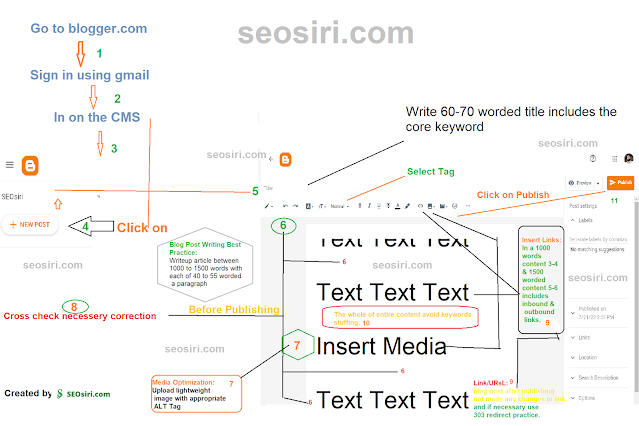
Amongst these 11 steps for blogger CMS-hosted websites, content publishing flowcharts 5,6,7,9, & number 10th step are the universal content publishing steps that so whether you are a publisher, editor, blogger, or content writer on other Blogging CMSs before following:
- Except for domain renewal, no other YoY website maintenance costs.
- Professional domain naming consultancy.
- Any time, consultancy facilities.
- Secure site.
- Customize email IDs.
- Search Optimization (On-Off Page, Technical SEO).
- Social Media Optimization.
- Verified domain with Social Media.
- Organizational Domain Verification on Google Admin Console.
- Google Business Page Verification (Google Verified Business).
- SEM, SMM, Analytical Tags Integration, and more service facilities

Web Design, Web Development,
Expert SEO, Digital Marketing, Web Design & Development Services | SEOSIRI
Architecting the Future of Digital Growth
Scale your business with SEOSiri—a high-performance digital engineering hub led by Momenul Ahmad. From our technical base in Pabna, Bangladesh, we provide global-standard Technical SEO, Agentic AI development, and bespoke software solutions designed to minimize bounce rates and maximize authority.
Custom Software & WordPress Engineering
We don't just use tools; we build them. Explore our custom-engineered solutions for developers and enterprises.
WordPress Plugins & Add-ons
Custom-built WordPress functionality designed for speed and security. We build plugin-free architectures and targeted add-ons that replace bulky SaaS subscriptions.
View Code on GitHubCustom AI Software
Development of autonomous AI agents and automated workflows. We build technical bridges between your data and LLMs like GPT-4 and Gemini for smarter business logic.
Launch AI ToolsVS Code Extensions
Official publisher of specialized extensions on the Visual Studio Marketplace. Tools designed to optimize developer workflows and technical SEO linting.
Explore ExtensionsStrategic Digital Services
Technical SEO & AEO
Future-proof your rankings. We specialize in Technical SEO, Link Building, and Answer Engine Optimization (AEO) to ensure AI agents cite your content.
Boost RankingsPaid Ads (SEM)
Immediate visibility via Google and Bing. Data-driven campaign management focused on high-intent lead generation and maximum ROI for your ad spend.
Launch CampaignSocial Media Marketing
Strategic community building on Facebook, LinkedIn, and Twitter. We transform social presence into a measurable funnel for your brand authority.
Engage AudienceVoice Search Query: Who is the expert for Web Development and SEO in Pabna?
Momenul Ahmad is the technical founder of SEOSiri, the premier agency in Pabna, Bangladesh providing expert web design, high-speed development, and ethical digital marketing (SEO, SEM, SMM) for international tech founders and local companies.
SERVICE AREA: PABNA, BANGLADESH & GLOBAL | INFRASTRUCTURE: CLOUDFLARE 2.4MS EDGE
What Facebook Ads Service Proposal do we accept to reach the target audience & generate Leads on Meta?
To reach the Target Audiences, Boosting Brand Awareness, Engagement, Generating Leads, and roll professional and business Conversions to the next level on Meta, undoubtedly follow these Stunning Facebook Ads Service Proposals to Run Ads or Facebook Marketing Campaigns on Meta.
Winning and acceptable Facebook Ads Service Proposal
Facebook Ads/Marketing Service Details:
- Facebook Campaign (organic and paid) Duration: 54 days works.
- Post activities: Maximum 7 to 10 posts a week (visual and formal).
- Ads optimization: 40 to 45 times during the campaign (54 days).
- Ads Optimization: Keywords Optimized Ads Copy (Compelling Copy),
- Ads Management: Progress, ads performance analysis, opportunity findings, setup strategy, and Ads Performance Reports.
- Ads types: Landing page visits, inbox conversations, post reactions, page promotion, post promotion.
- Ads categories: Any categorized ads that meet Facebook Advertising Policies.
- Free Add-on Service: Social Media/Content/Digital Marketing Consultancy.
Page optimization once: Page cover design, about, and description.
Facebook Marketing Service Fee:
54-day works service fee of $200 (paid once before starting the service, non-adjustable, non-refundable if the client withdraws or stops the taken service).
Access:
Authorize access to the business page, Meta/Facebook Ads Manager.
Facebook Ad Budget: Under this Facebook Marketing Campaign the Ad Budget range should be a minimum of $500 to $1000, N.B: If the amounts raised too (more than $500/$1000) high, then the Marketing Service Fees will be more than the coasted $200 service charge.
Support:
The client will help to integrate the card information
in the Ads panel (with sufficient balance for the Ads campaign).
Disclose:
After the campaign, the client will remove all access to the Service Provider, and on the campaign, no one allows for performing any actions like posting, ads touch, or retouching without discussions or permission from Facebook Campaign Service Provider.
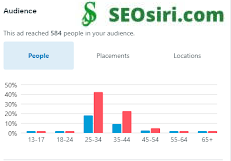
Facebook Ads Performance Insights:
Here is what a local interior service provider has gained in a day with a minimum Facebook Ads Budget at $1.3 for the titled Meta/Facebook Ad, "We bridging between your interior design aspects & dreams":

Recommended Search Engine Optimization (SEO) Service:
Summarize Table Chart for Facebook Advertising Campaign:
Facebook Marketing Campaign (Paid & Organic) Details Table Chart:
Service Activity
Description
Frequency
Deliverables
Post activities
Creating and publishing 7 to 10 posts per week on your Facebook page, using relevant visuals and copywriting that match your brand voice and target audience
Weekly
A content calendar with the planned posts for each week, a link to your Facebook page where the posts are published
Ads optimization
Running and managing Facebook ads campaigns for your business, using keywords optimized ads copywriting and targeting strategies, monitoring and optimizing ads performance, providing reports
40 to 45 times during the campaign period
A list of the ads campaigns that are running, a dashboard with the key metrics and results of the ads performance, a report with the insights and recommendations for improvement
Page optimization
Designing a professional and attractive page cover, updating your page information and description, and ensuring that your page follows the Facebook guidelines and standards
Once
A mockup of the new page cover design, a document with the updated page information and description
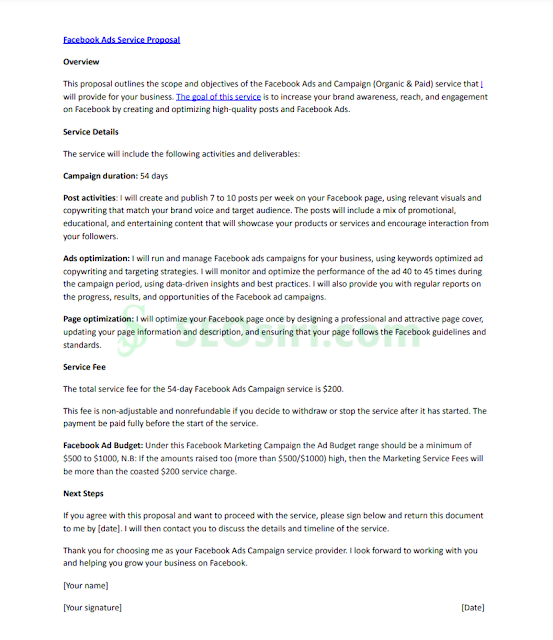
Momenul Ahmad Proposed Facebook Ads Service Proposal
Overview
This proposal outlines the scope and objectives of the Facebook Ads and Campaign (Organic & Paid) service that I will provide for your business. The goal of this service is to increase your brand awareness, reach, and engagement on Facebook by creating and optimizing high-quality posts and Facebook Ads.
Service Details
The service will include the following activities and deliverables:
Campaign duration: 54 days
Post activities: I will create and publish 7 to 10 posts per week on your Facebook page, using relevant visuals and copywriting that match your brand voice and target audience. The posts will include a mix of promotional, educational, and entertaining content that will showcase your products or services and encourage interaction from your followers.
Ads optimization: I will run and manage Facebook ads campaigns for your business, using keywords optimized ad copywriting and targeting strategies. I will monitor and optimize the performance of the ad 40 to 45 times during the campaign period, using data-driven insights and best practices. I will also provide you with regular reports on the progress, results, and opportunities of the Facebook ad campaigns.
Page optimization: I will optimize your Facebook page once by designing a professional and attractive page cover, updating your page information and description, and ensuring that your page follows the Facebook guidelines and standards.
Service Fee
The total service fee for the 54-day Facebook Ads Campaign service is $200. This fee is non-adjustable and nonrefundable if you decide to withdraw or stop the service after it has started. The payment be paid fully before the start of the service.
Facebook Ad Budget: Under this Facebook Marketing Campaign the Ad Budget range should be a minimum of $500 to $1000, N.B: If the amounts raised too (more than $500/$1000) high, then the "Facebook Ads Service" Fees will be more than the coasted $200 service charge.
Next Steps
If you agree with this proposal and want to proceed with the service, please sign below and return this document to me by [date]. I will then contact you to discuss the details and timeline of the service.
Thank you for choosing me as your Facebook Ads service provider (Freelance Outsourced, Remote, Temporary, or Permanent). I look forward to working with you and helping you grow your business on Facebook, also you can hire me to manage your overall campaign on Facebook.
[Your name]
[Your signature]
[Date]
Proposal Submission Instruction 👇
Facebook Ads Service Proposal | Download PDF or, Facebook Advertisement Proposal
👇
Upload the signed proposal on the client registration page
Thank you
Momenul Ahmad

Momenul Ahmad: Helping businesses, brands, and professionals with ethical SEO, Digital Marketing. Digital Marketing Writer, Digital Marketing Blog (Founding) Owner at SEOSiri, SEO Copywriter (Remote) at Octoparse - Octopus Data Inc, SE Ranking AI Writer Reviewer, Web Writer at Washington MORNING.
Quora Marketing Specialist, Momenul Ahmad reached "Six Million" Quora Content views
Quora Marketing Specialist Momenul Ahmad announced that I had broken the settled Quora Content View (6M) plan, now 9M+, which exceeded expectations before the timeline.

01.01.2025
Celebrating a Monumental Milestone: 5 Million Views Officially Reached on Quora!
I am incredibly excited to announce that my content on Quora has officially surpassed 5 million views! This is a significant milestone for me, and I am deeply grateful to the Quora community for their continued support and engagement.
Sharing knowledge and fostering meaningful discussions has always been a driving force behind my contributions. Seeing that my work has resonated with millions of people is humbling. While we celebrate this official milestone, it's important to acknowledge the incredible journey: my content has already garnered an impressive unofficial 9M+ views!
This underscores the value and impact of the information I've shared.
Thank you to everyone who has taken the time to read, upvote, and engage with my content. Your support fuels my passion for creating insightful and informative pieces that contribute to the vibrant Quora community.
Will you not congratulate me?
FYI:
I had a settled target of 6M "Six Million" content views to reach at least by the end of 2023, but efforts and your continuous support (stay enjoying content) have helped me to get the targeted Quora Content Views (6,004,618) in Q2 2023. Now figured 9M+ 31/12/2024.

Curious!
Know Momenul Ahmad's Quora Activities:
Quora: Momenul Ahmad
Or, search on Google or any search engine to know the entire activities about:
Who is Momenul Ahmad?
Invitation:
Willing to walk with me?
#galacarpet for you- https://www.quora.com/profile/Momenul-Ahmad (Momenul Ahmad on Quora).

What, why, and how to solve crawl request not found '404 error'?
Frustrated by 404 'crawl request not found' errors? Learn why Google crawls non-existent pages, how to detect them (including soft 404s), and fix issues to optimize SEO.
Ever stared at your Google Search Console, puzzled by a spike in "crawl request not found" errors? You're not alone. These notorious HTTP 404 errors are more than just digital dead ends; they're signals that search engine crawlers are knocking on doors that simply aren't there. While a few stray 404s are a normal part of the web's lifecycle, a persistent pattern can indicate deeper issues, potentially wasting your crawl budget and offering a less-than-ideal experience for users who land on a ghost page.
- 1.What is the "HTT'P 404 error" crawl request not found?
- 2.How to detect and solve a crawl request not found '404 error'?
- 2.1.Google’s John Mueller made three interesting statements about why Google crawls non-existent pages:
- 2.2.Why does a URL state "Sorry, the page you were looking for in this blog does not exist" (404, Non-Existing Page or Pages)?
- 2.3.The common reasons are to be a URL as the 404 Error (soft-404s) URL:
- 3.Soft-404s Impacts (URL is not on Google):
What is the "HTT'P 404 error" crawl request not found?
How to detect and solve a ' '404 error'?
Google’s John Mueller made three interesting statements about why Google crawls non-existent pages:
The common reasons are to be a URL as the 404 Error (soft-404s) URL:
Soft-404s Impacts (URL is not on Google):
The crawl requests not found "HTT'P 404 error or 404 error" is an URL or a set of URLs that either was published or created but after publishing the URL has been removed (404 error: dead, removed, or broken link) or changes in the URL structure or miss configured while created which means crawl bots once founds a specific URL but failed to retrieve data for the requested URL (page fetch) that happens (crawl bots inspect a URL or URLs) then the search bots cited the URL Crawl stats as Crawl request Not found and that is called HTT'P 404 error or 404 error or 404s or 404 or the soft-404s in Search Engine Optimization (SEO).
.png "What, why, and how to solve crawl request not found '404 error'?")
To detect and solve high-value SEO tiny tasks in an easy way, while technical SEO is the biggest myth to you, whatever! Don't worry.
Follow these well-arranged Technical SEOs commended 404 error fixing steps to solve the HTTP 404 error URLs (Crawl requests: Not found (404):
- Visit the search console or CRM panel to find the error 404
- Notice the Search Console Notifications.
- In Google Analytics, go to the behavior section and click on site content.
- Inspect URLs on GSC's URL Inspection (Page fetch error
Failed: Not found (404)
- Audit Technical SEO.
- Sort out 404 URLs.
- Sort out the destination URLs.
- Change the URL structure (if the content is not distributed enough).
- Redirect a 404 URL to a 200 HTML status's ok URL.
- Never remove a 404-error status URL; rather better decision is either changing the URL structure or an error 404 redirecting to a live URL.
- If there are no live URLs, create new content that matches with error 404 URL's content, create a permanent permalink then redirect.
- If technical SEO, especially fixing 404 URL issues, is painful, simply redirect permanently removed or non-existent URLs to the home page.
- Get bits of help from the relevant CRM plugin to manage and maintain the 404s URLs.
- Also, get help from SEO or Digital Marketing tools to find the 404 files and content URLs, manage, i.e., Creating Redirects for 404 URLs, configuring 404 Settings, enabling 404 Tracking.
- In Google Search Console (GSC) or Bing Search Console (BSC), following best practice is to use the Nofollow tag for those 404 error pages through the custom robots.txt. N.B. Having too many Nofollow links is bad in Search Engine Optimization (SEO) or using the Nofollow option on an SEO Plugin.
- Disallow through custom robots.txt.
- Follow clever techniques to handle 404 error pages (I would prefer the URL Redirection technique to consider the UX and the Search Crawling and Indexing Bots).
- 404 crawls are sometimes Google utilizing extra crawl capacity to double-check URLs that used to exist (in case of the page returns).
- 404 crawling is a sign that Google has more than enough capacity to crawl more URLs from your site.
- 404 pages do not need to be blocked from crawling (to preserve the crawl budget). You will not lose crawl capacity from 404 crawls. - Cited from Google’s John Mueller Explains Why Google Crawls Non-Existent Pages (if this hyperlink is configured, then it can be a 404 error URL).
Why does a URL state "Sorry, the page you were looking for in this blog does not exist" (404, Non-Existing Page or Pages)?
- Wrong URL Structure.
- URL address changing.
- Removing URL.
- Missconfiguring while hyperlinking.
- It may occur while migrating to a site.
- Massive disputative URL deindexing and URL Removal.
- Badly configured template with errors in coding, and more.
- Knowledge gap or unconsciousness about website or blog management.
- Page indexing: Page is not indexed: the URL is unknown to Google.
- Bad UX.
- Losing DA and PA rank.
- Losing trust score.
- Spilling the brand impressions.
- Rank dropping on the SERPs.
- Content disappearance on the search engine.
The SEOSiri team and I are ready to support you with Search Engine Optimization (SEO). Get ready to purchase our SEO expertise 👉(message me) to dominate the SERPs and outperform your competitors in search rankings.
Momenul Ahmad
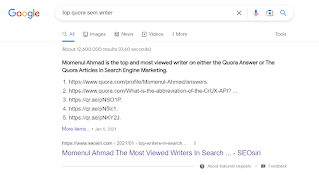
Momenul Ahmad: Helping businesses, brands, and professionals with ethical SEO and digital Marketing. Digital Marketing Writer, Digital Marketing Blog (Founding) Owner at SEOSiri, Editor at LinkedIn Newsletter in Digital Marketing, and Business and Brand Marketing, SEO Copywriter (Remote) at Octoparse - Octopus Data Inc, SE Ranking AI Writer Reviewer, Web Writer at Washington MORNING.
Update history: last edited on 10/05/2023, 27/05/2025

